개선된 코드
이중 반복문 -> 단일 반복문
for (int i = 1; i <= n; i++)
{
    Console.WriteLine(new string('*', i));
}
new string('*', i) : *를 i개 만듦 !
cf) 참고 : 다른 한 줄 방법들
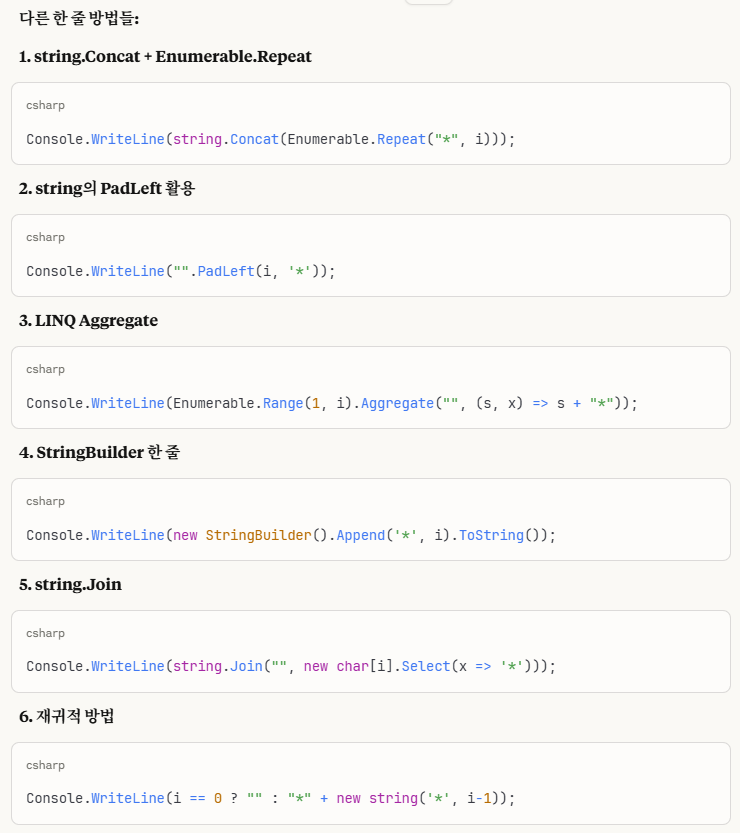
LINQ
using System;
using System.Linq; // LINQ가 아니라!

public class Example
{
    public static void Main()
    {
        int n = int.Parse(Console.ReadLine());

        Enumerable.Range(1, n).ToList()
            .ForEach(i => Console.WriteLine(new string('*', i)));
    }
}
- Enumerable.Range(1, n) : 1부터 n까지 숫자 생성 [1, 2, 3, ..., n]
- .ToList() : IEnumerable을 List로 변환
- .ForEach(i => ...) 각 숫자 (i)에 대해 실행
-> Range(1, 3) -> [1, 2, 3]
ForEach로 Console.~ 각각 실행
스트링빌더 사용 (new string('*', i)보다 느림)
using System;
using System.Text;

public class Example
{
    public static void Main()
    {
        int n = int.Parse(Console.ReadLine());

        for(int i = 1; i <= n; i++)
        {
            Console.WriteLine(new StringBuilder().Append('*', i));
        }
    }
}
new StringBuilder() : 새로운 스트링빌더 객체 생성
.Append('*', i) : 문자를 i번 추가
스트링 빌더가 더 느린 이유 : 데이터 개수가 적어서 (수백 개 이상일 때 빠름!)

같은 것)
StringBuilder sb = new StringBuilder();
sb.Append('*', 3);
Console.WriteLine(sb); // 자동으로 ToString() 호출
내가 제출한 답 (아래 -> 풀이과정)
using System;

// 입력 : 정수 n
// 출력 : 높이와 너비가 n인 직각 이등변 삼각형 모양 출력 (*으로)
public class Example
{
    public static void Main()
    {
        int n = int.Parse(Console.ReadLine());

        for(int i = 0; i < n; i++)
        {
            for (int j = 0; j < i + 1; j++)
            {
                Console.Write("*");
            }
            Console.Write('\n');
        }
    }
}
1. 이중반복문 변수명 주의
j++ 작성할 땐, i++로 헷갈리지 않게 조심 !
2. 정사각형 출력된 이유 : 반복 기준을 < n으로 두면 -> 상수라 고정된 값! (= 각 줄마다 같은 개수)
=> 1, 2, 3처럼 변하게 적용하고 싶으면 변수를 사용 ! (= i에 따라)
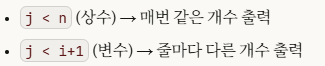
3. 고민한 것 : 끝에 공백을 어떻게 넣어줄지 (= 마지막 끝나는 걸 어떻게 알고?)

생각 못해본 것 : 마지막 줄 구분 (if (i < n-1))
풀이과정
using System;

// 입력 : 정수 n
// 출력 : 높이와 너비가 n인 직각 이등변 삼각형 모양 출력 (*으로)
public class Example
{
    public static void Main()
    {
        int n = int.Parse(Console.ReadLine());

        // 3트
        // 고민 : 앞에 공백 끼워넣으려면 if해야되고,

        // 생각났다!  < n이 갯수라서, string 받을 필요x
        // 줄 (아닌듯 이게 개수인듯)
        for(int i = 0; i < n; i++)
        {
            //Console.WriteLine("*"); // 3개 출력됐음

            // WriteLine -> 3줄

            // 조심 i++로 하니까, 너무 길었음!
            // j < n, j < i 차이
            // 하니까 *** / *** / ***
            // for (int j = 0; j < n; j++)

            // 하니까 Output size differs
            //for (int j = 0; j < i; j++)

            // 문제 : n-> 고정
            //for (int j = 0; j < n; j++)
            for (int j = 0; j < i + 1; j++)
            {
                //Console.Write("*"); // 3개 출력됐음
                Console.Write("*"); // 3개 출력됐음
            }
            // 이렇게 안 됨!
            // Console.Write(\n);
            Console.Write('\n');
            /*
            // 개수 (줄!)
            for (int j = 0; j < i; j++)
            {
                //Console.Write("*");
            }
            //Console.WriteLine("\n");
            */

        }


        /*
        string answer = "";

        for(int i = 0; i < n; i++)
        {
            for (int j = 0; j < n; j++)
            {
                Console.Write("*");
            }
            Console.WriteLine("\n");
        }
        */

        /*
        // 이렇게 쓰니까, 왜 * / *** / ***** 이 됨...??
        // 문제 2 : 반복문 범위
        //for(int i = 0; i < n; i++)
        for(int i = 0; i <= n; i++)
        {
            //string += i;
            //Console.WriteLine("*");
            // char 쓰라고 오류뜸
            answer += new string('*', i);

            Console.WriteLine(answer);
            //Console.WriteLine("*" * );
        }
        */
    }
}
8/14 다시 풀던 것
using System;

// 입력 : 정수 n
// 출력 : 높이와 너비가 n인 직각 이등변 삼각형 모양 출력 (*으로)
public class Example
{
    public static void Main()
    {
        int n = int.Parse(Console.ReadLine());

        string answer = "";

        for(int i = 0; i < n; i++)
        {
            for (int j = 0; j < n; j++)
            {
                Console.Write("*");
            }
            Console.WriteLine("\n");
        }


        /*
        // 이렇게 쓰니까, 왜 * / *** / ***** 이 됨...??
        // 문제 2 : 반복문 범위
        //for(int i = 0; i < n; i++)
        for(int i = 0; i <= n; i++)
        {
            //string += i;
            //Console.WriteLine("*");
            // char 쓰라고 오류뜸
            answer += new string('*', i);

            Console.WriteLine(answer);
            //Console.WriteLine("*" * );
        }
        */
    }
}
이전에 풀던 것
using System;

// 입력 : 정수 n
// 출력 : 높이, 너비가 n인 직각 이등변 삼각형
// 높이만큼 세로 반복,
// 직각 이등변 삼각형 변 길이 어떻게 구함 ?ㅇ?
public class Example
{
    public static void Main()
    {
        String[] s;

        Console.Clear();
        s = Console.ReadLine().Split(' ');

        int n = Int32.Parse(s[0]);

        Console.WriteLine("{0}", n);
    }
}'C# > 복습 완료' 카테고리의 다른 글
| 문자열 정렬하기 (2) (복습 완료) (0) | 2025.09.02 |
|---|---|
| 주사위의 개수 (복습 완료) (0) | 2025.08.21 |
| [C#]숨어있는 숫자의 덧셈(1) - 복습 완료 (0) | 2025.08.07 |
| [C#]문자 반복 출력하기 (프로그래머스) - (복습 완료) (0) | 2025.08.07 |