개선 코드
LINQ 버전
using System;
using System.Linq;

public class Solution {
    public int solution(string my_string) {
        return my_string.Where(char.IsDigit).Sum(ch => ch - '0');
    }
}
- Where(char.IsDigit) : char.IsDigit 메서드를 각 문자에 적용해서 숫자인 것만 필터링
- Sum(ch => ch - '0') : 필터링된 각 char에 대해 ch - '0' 변환 후 합계
+) char.IsDigit(string, index) 사용해서 푼 버전
* index가 필요하므로, foreach말고 for문 쓰 (가능하긴함)

using System;
using System.Collections.Generic;


public class Solution {
    public int solution(string my_string) {
        int answer = 0;

        // char 배열로 변환
        char[] charArr = my_string.ToCharArray();

        // 반복문
        int temp = 0;
        for (int i = 0; i < charArr.Length; i++)
        {
            if (char.IsDigit(my_string, i))
            {
                temp = int.Parse(my_string[i].ToString());
                answer += temp;
            }
        }

        return answer;
    }
}
불필요한 코드를 줄인다면
using System;
using System.Collections.Generic;

public class Solution {
    public int solution(string my_string) {
        int answer = 0;

        // 1. 배열로 변환 x, string으로 o
        for (int i = 0; i < my_string.Length; i++)
        {
            // 2. temp 변수(+ 정수로 변환) 사용 x, 바로 더하기
            if (char.IsDigit(my_string[i]))
            {
                answer += my_string[i] - '0'; // string의 i번째 char를 정수로 바로 변환
            }
        }
        return answer;
    }
}
1. 배열 대신 string으로 바로 접근
2. int.Parse(string) <- string만 가능 써서 int로 변환 대신,
char - '0';으로 정수로 변환하기
개선 코드
using System;
using System.Collections.Generic;

// C# : char.IsDigit(char)
public class Solution {
    public int solution(string my_string) {
        int answer = 0;

        // 1. char 배열로 변환 할 필요가 없음!
        // string이 인덱스 접근 가능하니까
        foreach(char ch in my_string)
        {
            if (char.IsDigit(ch))
            {
                // 2. ch - '0'으로 변환하기
                //temp = int.Parse(ch.ToString());
                //answer += temp;

                answer += ch - '0';
            }
        }

        /*
        char[] charArr = my_string.ToCharArray();

        int temp = 0;
        foreach(char ch in charArr)
        {
            if (char.IsDigit(ch))
            {
                temp = int.Parse(ch.ToString());
                answer += temp;
            }
        }
        */

        return answer;
    }
}
제출한 답
using System;
using System.Collections.Generic;

// C# : char.IsDigit(char)
public class Solution {
    public int solution(string my_string) {
        int answer = 0;

        // char 배열로 변환
        char[] charArr = my_string.ToCharArray();

        int temp = 0;
        foreach(char ch in charArr)
        {
            if (char.IsDigit(ch))
            {
                temp = int.Parse(ch.ToString());
                answer += temp;
            }
        }

        return answer;
    }
}
풀이 과정
using System;
using System.Collections.Generic;

// 숫자인지 판별 -> string x, char o
// 사용법 : isdigist(char) <- c고...
// C# : char.IsDigit(char)
public class Solution {
    public int solution(string my_string) {
        int answer = 0;

        // char 배열로 변환
        char[] charArr = my_string.ToCharArray();

        // 반복문
        // 숫자만 담는 list
        List<char> charList = new List<char>();
        int temp = 0;
        foreach(char ch in charArr)
        {
            //if (isdigist(ch))
            //if (IsDigit(ch))
            if (char.IsDigit(ch))
            {
                //charList.Add(ch);
                // 여기서 변환해서 answer에 더하면 되지않을까?
                //temp = int.Parse(ch);

                // char -> int는 다름 !
                // - 0을 빼거나, char.GetNumericValue(), int.Parse(char.ToString())
                temp = int.Parse(ch.ToString());

                // 또 문제 : =+로 풀었음! 안 헷갈리는 법 없을까...
                answer += temp;
            }
        }

        // 더하기 반복
        // 문제 : charList를 int로 변환 !
        //foreach(char ch in )


        return answer;
    }
}
-> 결국 list를 안 썼음
1. 숫자인지 판별 : string x, char o
-> 무조건 char로 변환해서 문자 개별로 확인해야함 !
이 아니고, string을 쓰려면 index도 매개변수로 필요 !
// 문자인지 판단

// char
Char.IsDigit(ch)

// string
Char.IsDigit(string, index)
https://learn.microsoft.com/ko-kr/dotnet/api/system.char.isdigit?view=net-9.0
Char.IsDigit Method (System)
Indicates whether a Unicode character is categorized as a decimal digit.
learn.microsoft.com
using System;

public class IsDigitSample {
    public static void Main() {
        char ch = '8';

        Console.WriteLine(Char.IsDigit(ch));					// Output: "True"
        Console.WriteLine(Char.IsDigit("sample string", 7));	// Output: "False"
    }
}
2. 공식문서 보면 Char.IsDigt(ch)인데, char.IsDigit(ch)로 해도 통과한 이유
cf. Array는 array.IndexOf() 불가능 <- 클래스 이름
이유 : char은 클래스(예시 : Array)가 아니라 타입 별칭이기 때문
별칭 : char, int, string
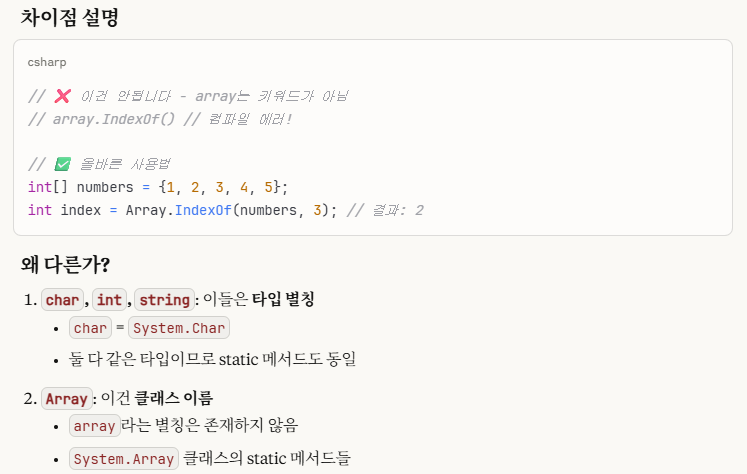


+) 별칭은 소문자 권장 ! (Char.IsDigit()가 아니라 char.IsDigit() 사용하기)
타입 별칭은 소문자, 클래스 이름은 대문자 !
3. char 배열로 변환할 필요 없이, string 사용하면 됨
이유 : string이 인덱스 접근 가능하니까
4. int.Parse(char.ToString()) 대신 ch - '0'으로 char -> int 변환하기 (더 빠름)
'C# > 복습 완료' 카테고리의 다른 글
| 문자열 정렬하기 (2) (복습 완료) (0) | 2025.09.02 |
|---|---|
| 주사위의 개수 (복습 완료) (0) | 2025.08.21 |
| 직각삼각형 출력하기 (복습 완료) (0) | 2025.08.14 |
| [C#]문자 반복 출력하기 (프로그래머스) - (복습 완료) (0) | 2025.08.07 |